Data Access Services at JSC
Within the WarmWorld project a services have been created to access data stored at the storage cluster of JSC. Those services require some compute resources from HPC systems. Due to the terms of use and security considerations, users need to register and authenticate when using those services.
The desired data are stored within a Fields DataBase, a domain specific object store, developed by ECMWF for their operational weather forecast and climate simulations.
Opening the STAC Catalog and Inspecting Assets
As a first step, we will open an entry from the STAC catalog and then go through the different assets.
In the next block, we list the different items within a collection. In this example the collection are datasets from the Integrated forecast system (IFS) stored at JSC. The datasets are sorted by IFS run and the type of level (here: model levels or pressure levels).
import pystac_client

stac_url = "https://wwestac.cloud.dkrz.de/stac-fastapi-es/"
collection_id = "JSC-IFS"

catalog = pystac_client.Client.open(stac_url)
collection = catalog.get_collection(collection_id)

for item in collection.get_items():
    print(f"Item Title: {item.properties.get('title')}")
    print(f"-- Item Description: {item.properties.get('description')}")
    print(f"-- Item ID: {item.id}")
    print()
Item Title: IFS run started at 20220401-00:00 on pl - pressure levels
-- Item Description: IFS data for the WarmWorld Easier use-case
-- Item ID: JSC-class~od_date~20220401_domain~g_expver~0001_stream~oper_time~0000_type~fc_levtype~pl

Item Title: IFS run started at 20220401-00:00 on ml - model levels
-- Item Description: IFS data for the WarmWorld Easier use-case
-- Item ID: JSC-class~od_date~20220401_domain~g_expver~0001_stream~oper_time~0000_type~fc_levtype~ml

Item Title: IFS run started at 20220315-00:00 on pl - pressure levels
-- Item Description: IFS data for the WarmWorld Easier use-case
-- Item ID: JSC-class~od_date~20220315_domain~g_expver~0001_stream~oper_time~0000_type~fc_levtype~pl

Item Title: IFS run started at 20220315-00:00 on ml - model levels
-- Item Description: IFS data for the WarmWorld Easier use-case
-- Item ID: JSC-class~od_date~20220315_domain~g_expver~0001_stream~oper_time~0000_type~fc_levtype~ml
From the above list, we select one of the items and explore the included assets. Assets describe the different ways to access the data.
The datasets are stored in an FDB. The access is done through a web service, that replies in JSON. The actual format of the data can either be Zarr over HTTP or a download in GRIB. The titles and roles give the information for each asset.
item_id = "JSC-class~od_date~20220315_domain~g_expver~0001_stream~oper_time~0000_type~fc_levtype~pl"
item = collection.get_item(item_id)

for asset_name, asset in item.assets.items():
    print(f"{asset.title}")
    print(f"-- type: {asset.media_type}")
    print(f"-- roles: {asset.roles}")
    print(f"-- description: {asset.description}")
    print(f"-- Volume: {asset.extra_fields['Volume']}")
    print(f"-- Number of fields: {asset.extra_fields['number of fields']}")
    print()
zarr-Stream Request
-- type: application/json
-- roles: ['API', 'data', 'ZARR', 'ready to use']
-- description: Opening of complete dataset as zarr. Included values are given in the metadata of this asset
-- Volume: 73.99 GB
-- Number of fields: 3025

incomplete zarr-Stream Request
-- type: application/json
-- roles: ['API', 'data', 'zarr', 'requires specification']
-- description: Opening of the dataset as zarr. You need to add the missing metadata to the request. We use a MARS based format. The following keys are required: levelist, param, step, param_sfc, levtype. Possible values are given in the metadata of this asset.
-- Volume: 73.99 GB
-- Number of fields: 3025

grib-Download
-- type: application/json
-- roles: ['API', 'data', 'GRIB', 'ready to use']
-- description: Link to request download of full dataset. The preparation of the dataset can require some time. The download might require a large amount of disc space. Included values are given in the metadata of this asset.
-- Volume: 69.58 GB
-- Number of fields: 2850

incomplete grib-Download
-- type: application/json
-- roles: ['API', 'data', 'GRIB', 'requires specification']
-- description: Link to request download of full dataset. The preparation of the dataset can require some time. The download might require a large amount of disc space. You need to add the missing metadata to the request. We use a MARS based format. The following keys are required: levelist, param, step. Possible values are given in the metadata of this asset.
-- Volume: 69.58 GB
-- Number of fields: 2850

surface grib-Download
-- type: application/json
-- roles: ['API', 'data', 'GRIB', 'ready to use']
-- description: Link to request download of full dataset. The preparation of the dataset can require some time. The download might require a large amount of disc space. Included values are given in the metadata of this asset.
-- Volume: 4.41 GB
-- Number of fields: 175

incomplete surface grib-Download
-- type: application/json
-- roles: ['API', 'data', 'GRIB', 'requires specification']
-- description: Link to request download of full dataset. The preparation of the dataset can require some time. The download might require a large amount of disc space. You need to add the missing metadata to the request. We use a MARS based format. The following keys are required: param, step. Possible values are given in the metadata of this asset.
-- Volume: 4.41 GB
-- Number of fields: 175
Preparing authentication
We are using the HelmholtzID for the authentication and authorization process. Instead of providing credentials through a login screen, we use access tokens, which have been prepared beforehand. The services are realized as Restful APIs. Here, the required token is obtained and the header is prepared. The format is a standard.
First you need to create your account, as described in the documentation of the HelmholtzID. The account is tight to your institutional account and only requires a first activation. The login is always handled by your institution as identity provider.
This approach requires the installation and setup of the OpenID connect agent. You can for example follow this explanations at
documentation of the HelmholtzID at Helmholtz Federated IT Services (HIFIS)
Both have been proven quite valuable for the setup.
Afterwards, we can create the EasierUserClient with the identifier for openID-Connect short name. This will handle the request for a new token. There are also two alternatives: We can provide a valid token to the user client or a custom function that provides a token.
Last but not least, the user client, can be given a system name. This allows to access an asset based on the current storage cluster of an HPC system. This allows the client to select local Zarr stores over remote Zarr over HTTP access.
For now, let us assume, that we are on our local computer and just want to analyze some data, so we provide None. More details on the user client and its installation can be found here.
from warmworld_easier_user_client.user_client import EasierUserClient
from hidden_settings import oidc_short_name

user_client = EasierUserClient(system_name=None, oidc_short_name=oidc_short_name, access_token=None, token_function=None)
Intermezzo: Preparing a Plotting Function
In the next step, we want to access data through the different services. For a nice visualization, we create a plotting function, that relies on cartopy. cartopy requires external dependencies, that are not directly installed through a package manager like pip.
import matplotlib.pyplot as plt
import cartopy.crs as ccrs
import cartopy.feature as cf
import cmocean

def worldmap(var, **kwargs):
    projection = ccrs.PlateCarree(central_longitude=180)
    fig, ax = plt.subplots(
        figsize=(8, 4), subplot_kw={"projection": projection},# constrained_layout=True
    )
    ax.set_global()
    xlims = ax.get_xlim()
    ylims = ax.get_ylim()
    extend = xlims + ylims
    # we need to flip the data vertically due to how the latitude is stored
    data = var[::-1]
    ax.imshow(data, extent=extend, origin="lower", **kwargs)
    ax.add_feature(cf.COASTLINE, linewidth=0.8)
    ax.add_feature(cf.BORDERS, linewidth=0.4)
Zarr over HTTP (alpha)
Colleagues at ECMWF started the development of an interface to serve data from an FDB in the zarr format over http. Therefore, a service is spin up on demand on the HPC system to serve the data. This on demand creation also allows to create arbitrary datasets, that only contain a subset of the complete datacube.
For the access to the data, we need the request package. The waiting time until the service is ready to serve data can include quite some waiting. Therefore, we wait between subsequent requests, if the data are ready. In this first block, we request the start of the service and our dataset.
We simply pass the selected item from the catalog to the open_dataset function and this will do the rest. As we request access to data through the Zarr-FDB Interface, we might need to wait some time until a Server has been spin up on the HPC system. All this is handled by the user client, and we receive an open Zarr dataset, in this case a Zarr-array.
z_arr = user_client.open_dataset(item)
{
  "task_id": "dba8c2f2-bc2a-4265-a3c2-a63b94285eae",
  "status": "https://esm-data.fz-juelich.de/api/v1/zarr/status/dba8c2f2-bc2a-4265-a3c2-a63b94285eae",
  "task_status": "STARTED",
  "help": "Please wait a moment and call the status link. It will redirect to the download as soon as the job is finished."
}
Update: zfdb server is running, opening dataset now.
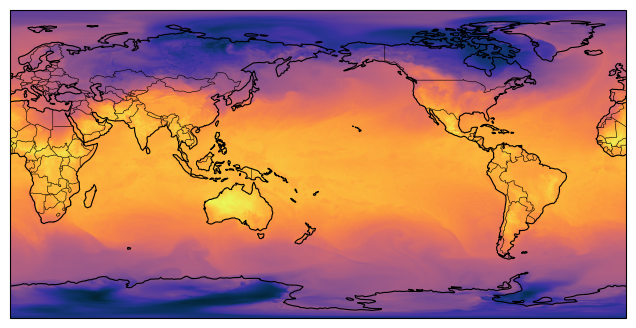
As a last step, we want to plot the dataset. Here you can see, that we need to reshape the data. In the current alpha phase, data and metadata are only served in a minimal manor. The current focus is the overall technical realization.
data = z_arr[0, 0, :]
data = data.reshape(2560, 5120)
worldmap(data, cmap=cmocean.cm.thermal)
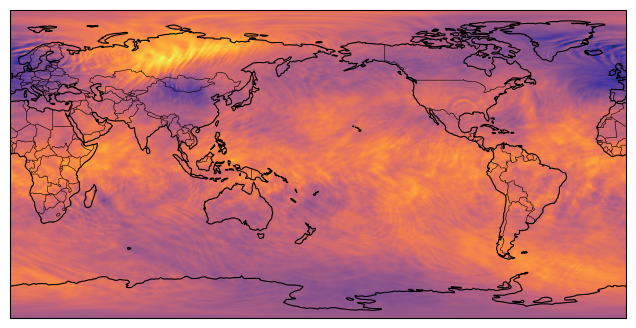
At the current state this is a prototypical implementation and illustrates the basic functionalities. For example the available metadata are still quite limited and will be extended in a later version.
for x in z_arr.attrs.items():
    print(f"{x[0]}: {x[1]}")
print(z_arr.info)
copyright: ecmwf
zarr_format: 3
variables: []
Type               : Array
Zarr format        : 3
Data type          : Float32(endianness='little')
Fill value         : -1.0
Shape              : (25, 121, 13107200)
Chunk shape        : (1, 1, 13107200)
Order              : C
Read-only          : True
Store type         : FsspecStore
Filters            : ()
Serializer         : BytesCodec(endian=<Endian.little: 'little'>)
Compressors        : ()
No. bytes          : 158597120000 (147.7G)
Zarr over HTTP with a Customized Request (alpha)
The zarr datasets are created on the fly through the Fields DataBase. This allows the creation of custom requests through the API. The above presented full request includes a predefined data cube. In case a user is only interest in a subsection of this data, we provide a prepared request. This allows specifying the last details like level, parameter or the forecast step.
First we access the catalog like above but now we request another asset. We also print the description.
asset = item.assets["incomplete zarr-Stream Request"]
print(asset.description)
Opening of the dataset as zarr. You need to add the missing metadata to the request. We use a MARS based format. The following keys are required: levelist, param, step, param_sfc, levtype. Possible values are given in the metadata of this asset.
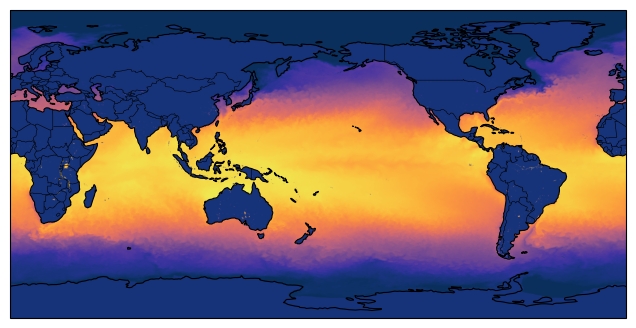
The description tells us, that we need to specify the parameter (param) and forecast step (step). Here, we decide to use the sea surface temperature (grib code 34) and the forecast step 2.
We can prepare them as a simple dictionary.
details = {
    "levtype": "sfc",
    "param": "34",
    "step": "0",
}
We now can pass the details to the open_dataset function. This automatically triggers selection of the correct asset, builds the request to the server and afterwards opens the Zarr-array
z_arr = user_client.open_dataset(item, details=details)

data = z_arr[0, 0, :]
data = data.reshape(2560, 5120)
worldmap(data, cmap=cmocean.cm.thermal)
{
  "task_id": "090b2f77-d1f4-4c71-85f0-96ec26f2b205",
  "status": "https://esm-data.fz-juelich.de/api/v1/zarr/status/090b2f77-d1f4-4c71-85f0-96ec26f2b205",
  "task_status": "STARTED",
  "help": "Please wait a moment and call the status link. It will redirect to the download as soon as the job is finished."
}
Update: zfdb server is running, opening dataset now.
Alternative access to surface data
asset = item.assets["incomplete zarr-Stream Request"]
zarr_request_link = asset.href
print(asset.description)
Opening of the dataset as zarr. You need to add the missing metadata to the request. We use a MARS based format. The following keys are required: levelist, param, step, param_sfc, levtype. Possible values are given in the metadata of this asset.
We also made a custom definition, that allows to request only parameters of the surface type.
For the demonstration we remove the definition definition of the levtype from the request.
We can also use param_sfc together with levtype=sfc and without specifying param.
details = {
    "param_sfc": "34",
    "step": "0",
}
z_arr = user_client.open_dataset(item, details=details)
print(z_arr.info)
{
  "task_id": "785567c1-37b3-4a64-a321-769c21d1c161",
  "status": "https://esm-data.fz-juelich.de/api/v1/zarr/status/785567c1-37b3-4a64-a321-769c21d1c161",
  "task_status": "STARTED",
  "help": "Please wait a moment and call the status link. It will redirect to the download as soon as the job is finished."
}
Update: zfdb server is running, opening dataset now.
Type               : Array
Zarr format        : 3
Data type          : Float32(endianness='little')
Fill value         : -1.0
Shape              : (1, 1, 13107200)
Chunk shape        : (1, 1, 13107200)
Order              : C
Read-only          : True
Store type         : FsspecStore
Filters            : ()
Serializer         : BytesCodec(endian=<Endian.little: 'little'>)
Compressors        : ()
No. bytes          : 52428800 (50.0M)
The important feature is that we can open a zarr store that contains surface and level data. The current default implementation merges the levelist and parameter values to a single axis.
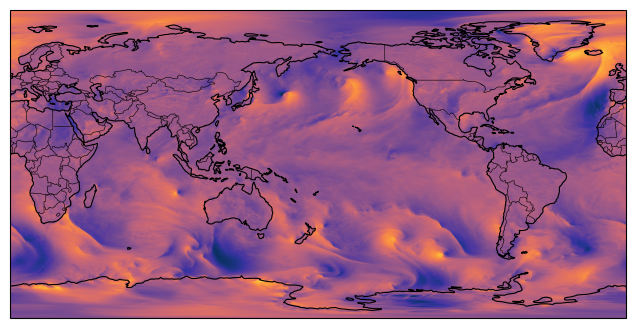
For the sake of this example, we switch to the a different item in the STAC catalog. This represents model level data of this dataset. We use the incomplete request for a zarr store and add our desired parameter (here 132, the v component of wind) and at least one level (here 137), step and surface parameter.
We also add a loop to plot both fields and a print for the zarr group metadata.
item_ml = collection.get_item("JSC-class~od_date~20220315_domain~g_expver~0001_stream~oper_time~0000_type~fc_levtype~ml")
details = {
    "levtype": "ml",
    "param" : "132",
    "levelist" : "137",
    "param_sfc": "34",
    "step": "0",
}
z_grp = user_client.open_dataset(item_ml, details=details)

for idx in range(2):
    data = z_grp[0, idx, :]
    data = data.reshape(2560, 5120)
    worldmap(data, cmap=cmocean.cm.thermal)

print(z_grp.info)
{
  "task_id": "5f9f9062-0eb2-45c9-ba32-cb8c691ce8eb",
  "status": "https://esm-data.fz-juelich.de/api/v1/zarr/status/5f9f9062-0eb2-45c9-ba32-cb8c691ce8eb",
  "task_status": "STARTED",
  "help": "Please wait a moment and call the status link. It will redirect to the download as soon as the job is finished."
}
Update: zfdb server is running, opening dataset now.
Type               : Array
Zarr format        : 3
Data type          : Float32(endianness='little')
Fill value         : -1.0
Shape              : (1, 2, 13107200)
Chunk shape        : (1, 1, 13107200)
Order              : C
Read-only          : True
Store type         : FsspecStore
Filters            : ()
Serializer         : BytesCodec(endian=<Endian.little: 'little'>)
Compressors        : ()
No. bytes          : 104857600 (100.0M)
Download in GRIB Format
The Fields DataBase stores data in the GRIB format and combines several fields in a single file. As a basic download service we can offer data in GRIB format. This follows a similar workflow as requesting a zarr view on the data.
The download has a great advantage: a local copy of the data. Local access is most of the time faster than accessing data over the network. On the downside we need the required disc space. As we have seen at top, the download covers several gigabyte, we will here print the value as a reminder.
The 2D fields are part of the 3D datasets. The download is similar to the MARS interface, that does only allows downloading surface or 3D fields. So for simplicity let us download the surface fields. We already explored the asset names at the top of this page.
Until now, the user client does not support the download functionality, as this is specific for an FDB. It allows us here, to dive deeper into the setup and processing within the user client, as the principle design of the requests and workflow is similar.
At the moment a GRIB download offers more metadata. But we will use the function creating the headers for the HTTP requests from the user client, to make our life easier.
import requests
import json
asset = item.assets["surface grib-Download"]
print(f"Download size: {asset.extra_fields['Volume']}")
download_request_link = asset.href
response = requests.get(download_request_link, headers=user_client._get_headers())
response.raise_for_status()
Download size: 4.41 GB
Next, we need to wait until the data have been prepared for the download on the HPC system. During the data processing, we receive regularly status updates, which will change to the actual download as soon as the data are ready.
import time
response_body = response.json()
status_endpoint = response_body["status"]
while response.headers["Content-Type"] == "application/json" and "task_status" in response_body and response_body["task_status"] != "SUCCESS":
    time.sleep(10)
    response = requests.get(status_endpoint)
    response_body = response.json()
if "task_status" not in response_body:
    response.raise_for_status()
Now the service provided us with the link to download the data. This extra step is required as a direct download would load the hole file into memory. We are now opening the connection to the service and start iterating over the file to write it to disc.
In principle the download link is valid for some time. In contrast to the access through zarr, we do not need to keep computing resources available. The current default settings allow downloading the files for a few days.
download_url = response_body["download_url"]
file_name = "sample_data.grib"
response = requests.get(download_url, stream=True)
with open(file_name, "wb") as f:
    chunk_size = 8*1024
    for chunk in response.iter_content(chunk_size=chunk_size):
        f.write(chunk)
Last but not least we want to open the data with xarray and have a look at the metadata:
import xarray as xr
file_name = "sample_data.grib"
ds = xr.load_dataset(file_name, engine="cfgrib")
print(ds)
Ignoring index file 'sample_data.grib.5b7b6.idx' older than GRIB file
<xarray.Dataset> Size: 9GB
Dimensions:     (step: 25, latitude: 2560, longitude: 5120)
Coordinates:
    number      int64 8B 0
    time        datetime64[ns] 8B 2022-03-15
  * step        (step) timedelta64[ns] 200B 00:00:00 ... 1 days 00:00:00
    surface     float64 8B 0.0
  * latitude    (latitude) float64 20kB 89.95 89.88 89.81 ... -89.88 -89.95
  * longitude   (longitude) float64 41kB 0.0 0.07031 0.1406 ... 359.9 359.9
    valid_time  (step) datetime64[ns] 200B 2022-03-15 ... 2022-03-16
Data variables:
    siconc      (step, latitude, longitude) float32 1GB 1.0 1.0 1.0 ... 0.0 0.0
    sst         (step, latitude, longitude) float32 1GB 271.5 271.5 ... 273.2
    sp          (step, latitude, longitude) float32 1GB 9.832e+04 ... 6.974e+04
    tcw         (step, latitude, longitude) float32 1GB 6.887 6.887 ... 0.5551
    sd          (step, latitude, longitude) float32 1GB 0.0 0.0 ... 10.0 10.0
    tp          (step, latitude, longitude) float32 1GB 0.0 0.0 ... 0.0008011
    so          (step, latitude, longitude) float32 1GB 31.09 31.09 ... nan nan
Attributes:
    GRIB_edition:            1
    GRIB_centre:             ecmf
    GRIB_centreDescription:  European Centre for Medium-Range Weather Forecasts
    GRIB_subCentre:          0
    Conventions:             CF-1.7
    institution:             European Centre for Medium-Range Weather Forecasts
    history:                 2026-08-04T09:02 GRIB to CDM+CF via cfgrib-0.9.1...
worldmap(ds.sst[0], cmap=cmocean.cm.thermal)
Download with a Customized Request
Similar to the approach for the access through zarr over HTTP, we can also customize our request. We have a again a base request, that allows accessing the hole data cube with the restriction, that the final parameters are not yet set. The approach is similar to zarr, so we first select the asset from the catalog.
Here, we decide to plot data from the pressure levels. Therefore, we need to select a different item with the label JSC-class~od_date~20220315_domain~g_expver~0001_stream~oper_time~0000_type~fc_levtype~pl. Afterwards we select the the asset for the data access.
item_pl = collection.get_item("JSC-class~od_date~20220315_domain~g_expver~0001_stream~oper_time~0000_type~fc_levtype~pl")
asset_pl = item_pl.assets["incomplete grib-Download"]
download_request_link = asset_pl.href
print(asset.description)
Link to request download of full dataset. The preparation of the dataset can require some time. The download might require a large amount of disc space. Included values are given in the metadata of this asset.
We will again use the parameter 130 (temperature) and the level 1000hPa (levelist=1000) and step 2. Due to the number of levels, 3D variables require much more disc space. So we restrict our download to the single field we want to analyze in the next step:
details = {
    "param": "130",#"31",
    "step": "2",
    "levelist": "1000"
}
download_request_link += "&" + "&".join( f"{k}={v}" for k, v in details.items() )
Now we can handle the download in the same way as above:
# requesting data:
response = requests.get(download_request_link, headers=user_client._get_headers())
response.raise_for_status()

# waiting for processing on HPC:
response_body = response.json()
status_endpoint = response_body["status"]
while response.headers["Content-Type"] == "application/json" and "task_status" in response_body and response_body["task_status"] != "SUCCESS":
    time.sleep(10)
    response = requests.get(status_endpoint)
    response_body = response.json()
if "task_status" not in response_body:
    response.raise_for_status()

# download
download_url = response.json()["download_url"]
file_name_sf = "sample_data_single_field.grib"
response = requests.get(download_url, stream=True)
with open(file_name_sf, "wb") as f:
    for chunk in response.iter_content(chunk_size=10*1024):
        f.write(chunk)

# plotting:
ds = xr.load_dataset(file_name_sf, engine="cfgrib")
worldmap(ds.t, cmap=cmocean.cm.thermal)
Ignoring index file 'sample_data_single_field.grib.5b7b6.idx' older than GRIB file